
Day 0–12 WhatsApp Follow Up Messages for Real Estate Agents

Send a short, context-led message within minutes of a new lead, then follow a four-touch cadence spaced over several days. Example: “Hi Sarah, this is Donny from ERA. Thanks for asking about the 3-bedroom unit. When’s a good time for a quick call?” Build this into an automated sequence, but obey WhatsApp’s 24-hour customer service window and pause the moment a lead replies.
TL;DR:
Sending personalized WhatsApp follow-ups within 24 hours significantly boosts reply rates and engagement; after the window closes, only pre-approved templates can be used.
Successful sequences should be short, referencing specific interactions, and spaced over several days with clear calls to action, avoiding back-to-back messages.
Proper automation requires pause-on-reply logic and precise CRM triggers to prevent repetitive messaging and preserve lead trust.
Testing sequences on yourself and tracking reply rates, conversion, and opt-out rates helps optimize messaging effectiveness.
Teams should align every touchpoint with the lead status in the CRM, ensure opt-in compliance, and implement strict rules for immediate human response to replies.
Table of Contents
WhatsApp Follow-Up Message Templates by Sales Stage
The best WhatsApp follow-up messages share three traits: they’re short, they reference something specific about the interaction, and they end with one clear question. Below are templates organized by where the lead sits in your pipeline. Swap the bracketed details for the actual name, property, or date, and never send two templates back to back without checking what the last one said.
Same-day lead response templates:
“Hi [Name], thanks for reaching out about [Property/Listing]. I’m [Your Name] from [Agency]. Is now a good time for a 5-minute call, or would later today work better?”
“Hey [Name]! Saw you’re interested in [Area/Property Type]. I’ve got two listings that match what you described. Want me to send them over?”
“[Name], great to connect. Before I send details, can you tell me your target move-in timeline? It’ll help me narrow the options.”
Post-call or post-demo recap templates:
“Hi [Name], good speaking with you today. As discussed, here’s the [document/listing link]. Any questions before our next chat on [date]?”
“Thanks for the time today, [Name]. I’ve flagged the three units you liked. I’ll have the comparison sheet ready by tomorrow morning.”
Appointment reminder templates:
24-hour reminder: “Hi [Name], quick reminder about our viewing tomorrow at [time], [location]. Reply YES to confirm or let me know if anything’s changed.”
2-hour reminder: “[Name], see you in about 2 hours at [address]. I’ll be in the lobby with a blue folder. Text me if you’re running late.”
Proposal, pricing, and break-up messages:
“Hi [Name], I’ve attached the updated pricing for [Property]. Take a look when you can. Happy to walk through the numbers on a call if that’s easier.”
“Hey [Name], haven’t heard back in a bit. No pressure. If the timing’s off, I’ll check back in a month. Just let me know if I should stop reaching out.”
Every template above works because it names something concrete: the property, the date, the last conversation. Generic “just checking in” messages get ignored because they carry no context and ask nothing specific of the reader.
How Do You Turn These Templates Into an Automated Sequence?
Real estate follow-up text sequences work best when the spacing mirrors how buying decisions actually unfold. A tight cadence of day 1, day 3, day 7, and then weekly touches for engaged prospects gives a lead room to think without letting the thread go cold, and it’s widely used as a baseline cadence across follow-up frameworks.
A recommended sequence for a fresh lead looks like this:
Day 0: Immediate same-day response template, sent within minutes of the inquiry.
Day 2: A value-add follow-up, a resource, listing, or answer to a question they raised.
Day 5: A direct check-in asking for a specific next step, like a call or viewing.
Day 12: A soft break-up message that gives them an easy way to say “not now” without burning the relationship.
That spacing matches what balanced follow-up frameworks recommend: a quick initial follow-up, a handful of well-spaced touches, and a hard cap on total attempts before the lead moves into a longer-term nurture list instead of a daily push.
Before you switch this on for a whole team, run through this checklist:
Map every touchpoint to a specific lead status in your CRM (new, contacted, viewing scheduled, negotiating).
Set triggers so a status change fires the right template, not a generic one.
Configure tags for source, property type, and urgency so messages stay relevant.
Test the full sequence in a sandbox account before it touches real leads.
Enable pause-on-reply so any inbound message from the lead stops the scheduled sequence immediately.
That last step matters more than people expect. Automation that keeps firing scheduled messages after someone has already replied is one of the most common failures teams run into, and it’s a fast way to make a sequence look robotic and lose the lead’s trust, as HubSpot’s guidance on WhatsApp automation points out.
On tools: the WhatsApp Business App works fine for solo agents running a handful of conversations manually. Teams sending sequences at scale need an API-based platform that supports templates, tagging, and pause-on-reply logic, regardless of which vendor you pick.
Pro Tip: Test your sequence on yourself first. Send it to your own second phone number and read it cold, days apart, the way a lead would. You’ll catch the messages that sound fine in a spreadsheet but robotic in a real thread.
What Are WhatsApp’s Rules for Business Messaging?
WhatsApp draws a hard line at 24 hours. Once a customer messages you, you can send free-form replies for the next 24 hours. After that window closes, you can’t just message them again freely, you need a pre-approved template through the WhatsApp Business API, as ActiveCampaign explains in its breakdown of the 24-hour conversation window.
That single rule shapes your entire sequence design. Personalized, conversational outreach belongs inside that 24-hour window. Anything you need to send after it closes has to go through an approved template, which means less flexibility and more upfront planning.
Practical compliance checklist:
Get explicit opt-in before initiating contact. A business card exchange or a form submission with a WhatsApp consent checkbox counts. A scraped phone number does not.
Keep records of when and how each contact opted in, in case a platform asks for proof.
Classify templates correctly as either utility (appointment reminders, account updates) or marketing (offers, promotions), since misclassifying a marketing message as utility is a common reason templates get rejected.
Check vendor documentation before a mass rollout, since platforms differ in how they handle template approval and message categorization.
The 24-hour window in one line: free-form messaging only works within a day of the customer’s last message; everything after that needs an approved template.
What Makes a WhatsApp Follow-Up Message Actually Work?
Keep it short. Two to four sentences, one clear ask, no paragraph-length pitches. WhatsApp is a mobile-first, conversational channel, and a message that reads like an email gets skimmed and ignored.
A quick personalization checklist before you hit send:
Include the lead’s name and one specific detail from your last interaction.
Reference the exact property, price point, or question they raised, not a generic category.
Skip emojis in first contact with a new lead; they’re fine once the relationship warms up, but they read as unprofessional in an opening message to someone you haven’t met.
Never send two follow-ups back to back without a reply in between. That’s the fastest way to get reported.
When a lead replies, respond like a human within the hour if you can, since WhatsApp’s single-thread format keeps full context in one place, which is exactly why leads expect a fast, personal answer once they’ve engaged. If a lead asks you to stop, stop immediately and update your CRM so no automation fires again. If you get a stall reply like “not right now,” acknowledge it, offer a specific future check-in date, and move them into a longer nurture cadence instead of daily pressure.
Pro Tip: Combine channels for hot leads. A quick call plus a text within the first ten minutes of an inquiry often outperforms any single channel alone, since multi-channel outreach on fresh leads tends to lift conversion compared to WhatsApp or a call in isolation.
Which Metrics Tell You Your Follow-Ups Are Working?
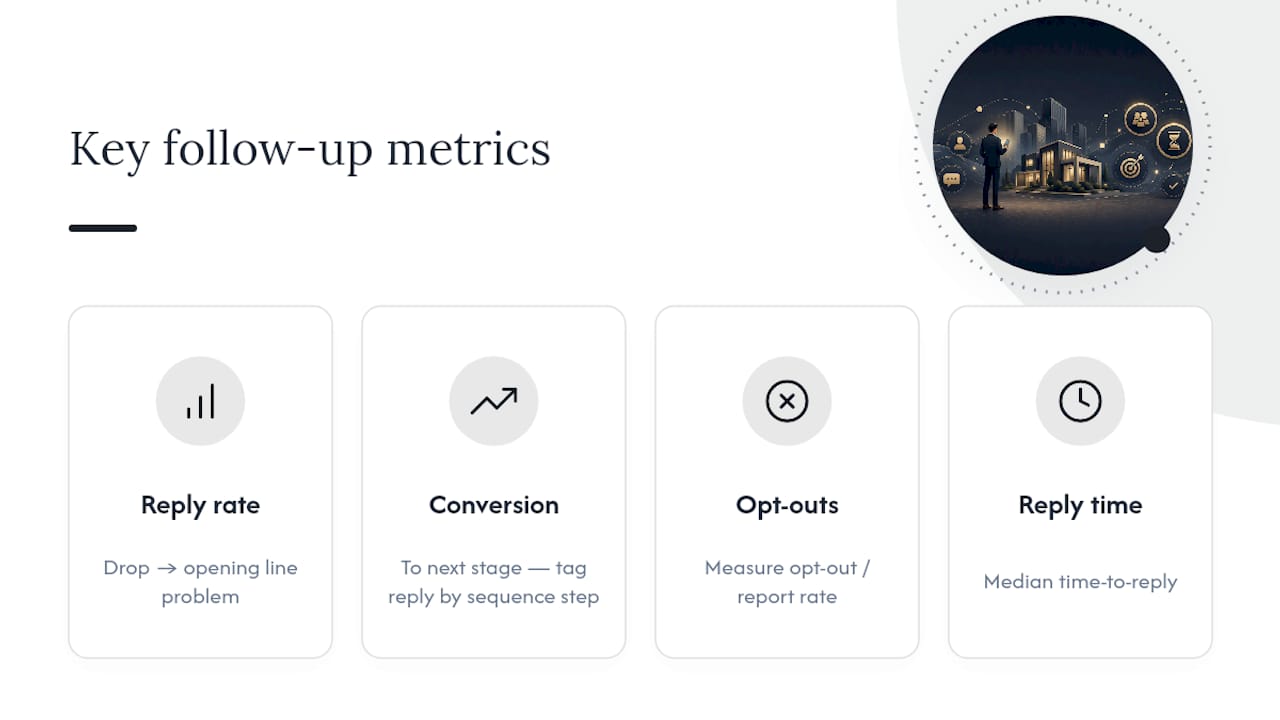
Track four numbers: reply rate, conversion to the next pipeline stage, opt-out or report rate, and median time-to-reply. If reply rate drops below what your team normally sees, the opening line is usually the problem, not the offer.
Run a simple A/B test: same sequence, two different opening lines, split evenly across incoming leads for two to three weeks or until each variant has at least a few dozen responses. Test one variable at a time, opening line or CTA, never both, or you won’t know which change moved the number. Tag every reply in your CRM by sequence step so you can see exactly which touch drove the conversion, not just that a lead eventually said yes.
How Does Myeracareer Put This Into Practice?
Agents scaling WhatsApp outreach run into the same wall: sequences built by hand break the moment a lead replies at an odd hour. A properly tagged CRM setup, the kind covered in Myeracareer’s best WhatsApp CRM guide, fixes that by triggering pause-on-reply automatically instead of relying on someone noticing.
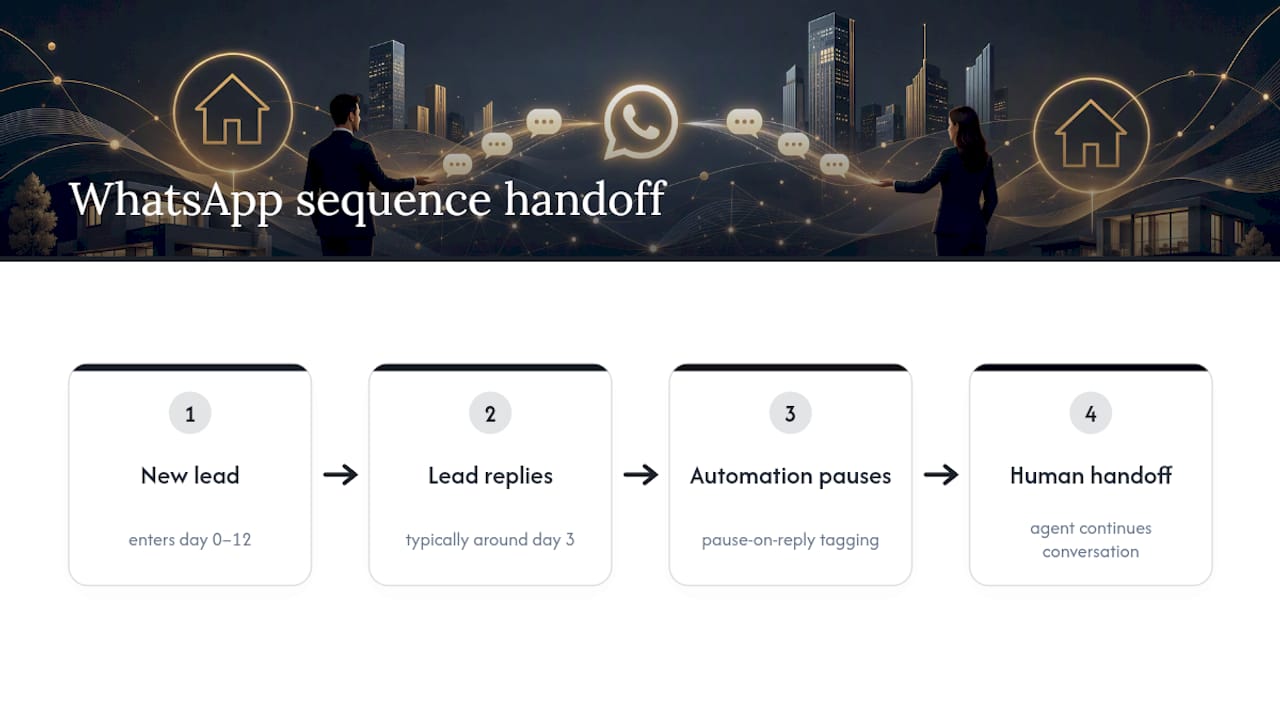
One pattern shows up consistently among agents who adopt this structure: a new lead gets the day 0 to day 12 sequence, replies around day 3, and the automation hands off cleanly to a human conversation instead of double-messaging. That handoff is what keeps a sequence from feeling automated at all. For teams building parallel channels, Myeracareer’s automated follow-up email guide covers the same pause and tagging logic for email sequences.
A Publisher’s Checklist for Fixing Broken Follow-Up Habits
Three mistakes show up in almost every underperforming sequence: messages sent without any reference to what the lead actually asked, no pause-on-reply logic, and giving up after one unanswered text instead of the four-touch cadence that data supports.
Fix it this week: write your day 0 template today, set your day 2/5/12 triggers, confirm pause-on-reply is live, record opt-in on every new contact, and review reply rates after two weeks. Respect an opt-out the moment it happens. No exceptions, no “just one more message.”
— Donny
How Myeracareer Supports Your Follow-Up Strategy
Building a follow-up sequence is one skill. Running it consistently across a growing team is another, and that’s where most agents actually struggle. Training and mentorship programs cover WhatsApp cadence design, CRM tagging, and coaching tools, built specifically for agents preparing for licensing or switching teams who want a system instead of guesswork.

If you’re a new agent still working through onboarding, Career With ERA’s new agent program pairs you with mentorship on exactly this kind of lead follow-up from day one. If you’re already leading a team and trying to standardize how everyone handles WhatsApp outreach, the experienced team leader track covers rolling out consistent sequences across a full roster. Either way, the next step is the same: reach out and find out which path fits where you are right now.
Sources
For policy details, read ActiveCampaign on the 24-hour window and Myeracareer’s CRM guide for setup.
Recommended
Comments