
Automated Follow-Up Emails for Sales Teams: A Practical Guide


For most sales teams, the shortlist comes down to three: Myeracareer Sales+ for real-estate teams that need coaching and tool adoption built into the workflow, ActiveCampaign for conditional branching and lead-scoring sequences, and Mailshake for high-volume cold outreach. If your team runs entirely on Gmail or Outlook, both support basic sequence workflows through native flags and add-ons before you commit to a dedicated platform. The single best next step: pick one tool, build a three-step sequence, and measure reply rate over 14 days.
Pipedrive defines follow-up automation as trigger- or schedule-based outreach that maintains consistent contact without manual sends, which is exactly the leverage point most sales teams underuse. According to Salesforge, a large share of replies come from follow-up messages rather than the initial email, which means the sequence itself is often where the deal is won or lost.
Key Takeaways
The most effective automated follow-up strategy combines stop-on-reply inbox threading, a three-touch sequence with a breakup email, and reply rate as the primary KPI reviewed every 14 days.
Point | Details |
Start with a 3-step sequence | Build one value-add, one social proof, and one breakup email before adding complexity. |
Stop-on-reply is mandatory | Configure it before enrolling any contacts to avoid double-contacting prospects who already responded. |
Reply rate is your primary KPI | Measure it after 14 days and A/B test the subject line on touch 2 first. |
Move non-responders to nurture | Drop unresponsive contacts to a monthly cadence rather than abandoning them entirely. |
Myeracareer Sales+ for team adoption | Pairs automation playbooks with coaching so sequences run consistently across every agent. |
Table of Contents
Which automated follow-up email tools are worth your time?
The table below covers all 12 tools across the dimensions that matter most for sales teams. Myeracareer Sales+ leads as the publisher’s recommended option for real-estate teams.
Tool | Best for | Automation features | Personalization & templates | Integrations | Reporting & analytics | Ease of use | Pricing shape | Deliverability features |
Real-estate teams: coaching + tool adoption | Playbook-driven sequences, stop-on-reply, performance tracking | Agent-specific templates, onboarding playbooks | ERA CRM, calendar, pipeline tools | Agent performance dashboards | Guided onboarding | Contact Myeracareer | Deliverability guidance in onboarding | |
Mailshake | Cold outreach, high-volume prospecting | Multi-step sequences, A/B testing, stop-on-reply | Merge tags, tested cold templates | Salesforce, HubSpot, Zapier | Reply/open/click tracking | Simple UI, fast setup | Paid plans available | Domain warm-up guidance |
ActiveCampaign | Advanced branching, lead scoring | Conditional logic, behavioral triggers, lead scoring | Dynamic content, many templates | Integrations with major CRMs | Deep funnel reporting | Moderate learning curve | From $15/mo (limited seats) | DKIM/SPF, spam testing |
HubSpot | Full CRM + sequences in one platform | Sequences, enrollment triggers, task automation | Personalization tokens, template library | Native CRM, Gmail, Outlook, Zapier | Sequence performance, deal attribution | Moderate; free tier available | Free tier; Sales Hub from $15/seat/mo | Built-in deliverability tools |
Mailchimp | Marketers and small sales teams | Automated nurture flows, journey builder | Drag-and-drop, content studio | Many integrations, Zapier | Campaign analytics, A/B testing | Beginner-friendly | Free tier; paid plans available | Deliverability resources, SPF/DKIM |
Campaigns by Pipedrive | Pipedrive CRM users | Pipeline-triggered campaigns, follow-up sequences | Email templates tied to deal stages | Native Pipedrive CRM, Zapier | Pipeline-linked reporting | Easy for Pipedrive users | Add-on to Pipedrive plans | Standard deliverability tools |
Brevo | Email + SMS multichannel teams | Automation workflows, transactional triggers | Template editor, SMS + email | 150+ integrations, Zapier | Campaign + transactional reporting | Accessible UI | Free tier; paid plans available | Dedicated IP option, SPF/DKIM |
MailerLite | Small teams on a budget | Automation workflows, trigger-based sequences | Drag-and-drop, landing pages | Shopify, WordPress, Zapier | Click maps, campaign reports | Very beginner-friendly | Free tier; paid plans available | Email verification, SPF/DKIM |
Moosend | Budget-conscious teams | Automated sequences, behavioral triggers | Template library, personalization | Zapier, WooCommerce, Salesforce | Real-time analytics | Clean, simple UI | Paid plans available; free trial | Spam testing, SPF/DKIM |
Flodesk | Design-forward simple sequences | Basic automation, welcome and nurture flows | Beautiful visual templates | Zapier, Shopify | Basic open/click reporting | Very easy | Flat monthly pricing | Standard deliverability |
Gmail (Google Workspace) | Individuals, small teams, inbox-native | Basic scheduling, add-ons (e.g., Streak, Yet Another Mail Merge) | Manual personalization, add-on templates | Google Calendar, Drive, Zapier | Limited native; add-on dependent | Familiar, zero learning curve | From $6/user/mo | Google infrastructure |
Outlook / Microsoft products | Microsoft-standardized teams | Built-in follow-up flags and reminders, add-ons for sequences | Manual; add-on dependent | Microsoft suite, Dynamics CRM | Limited native reporting | Familiar for enterprise teams | Bundled with Microsoft plans | Microsoft infrastructure |
Myeracareer Sales+ stands apart because the tool and the training arrive together. Most platforms hand you a sequence builder and leave adoption to you. Sales+ pairs automation playbooks with agent onboarding, template audits, and performance dashboards, so the sequence actually gets used consistently across a team rather than sitting idle after the first week.
Mailshake is purpose-built for cold outreach volume. Its UI is deliberately simple: build a sequence, set delays, connect your inbox, and launch. It handles stop-on-reply cleanly and offers A/B testing on subject lines, which makes it a strong fit for outbound SDR teams running high-touch prospecting.
ActiveCampaign earns its place for teams that need conditional logic. If a contact opens but does not click, they move to branch A; if they click but do not book, branch B fires a different message. That behavioral branching, combined with lead scoring, keeps warm prospects in a tighter cadence without over-contacting cold ones. The tradeoff is setup time.
HubSpot suits teams that want CRM and sequencing in one place. The free tier is genuinely functional for small teams, and the native Gmail and Outlook integrations mean reps send from their own inbox rather than a platform address, which preserves threading and reply detection.
Mailchimp is the most accessible entry point for marketers who also run nurture sequences. Its cadence guidance and deliverability resources are among the clearest published by any vendor, making it a practical choice for teams that are new to email follow up automation.
Campaigns by Pipedrive is the natural choice if your team already lives in Pipedrive. Sequences trigger directly from deal stages, so follow-ups stay synchronized with pipeline movement without any manual enrollment.
Brevo adds SMS to the mix at competitive pricing, which matters for multichannel teams that want a single platform for both email and text outreach.
MailerLite and Moosend both offer solid core automation at entry prices that suit smaller teams or individual agents testing sequences for the first time.
Flodesk prioritizes visual design over depth. If your brand presentation matters as much as the sequence logic, its templates are genuinely distinctive. For complex sales flows, it is too limited.
Gmail and Outlook work for individuals who want to stay in their inbox. Gmail add-ons like Streak or Yet Another Mail Merge add basic sequencing; Outlook’s built-in follow-up flags handle simple reminders. Neither replaces a dedicated platform for team-scale outreach, but both are a legitimate starting point.
How do you choose the right follow-up automation tool for your sales team?
Start with five questions before you trial anything.
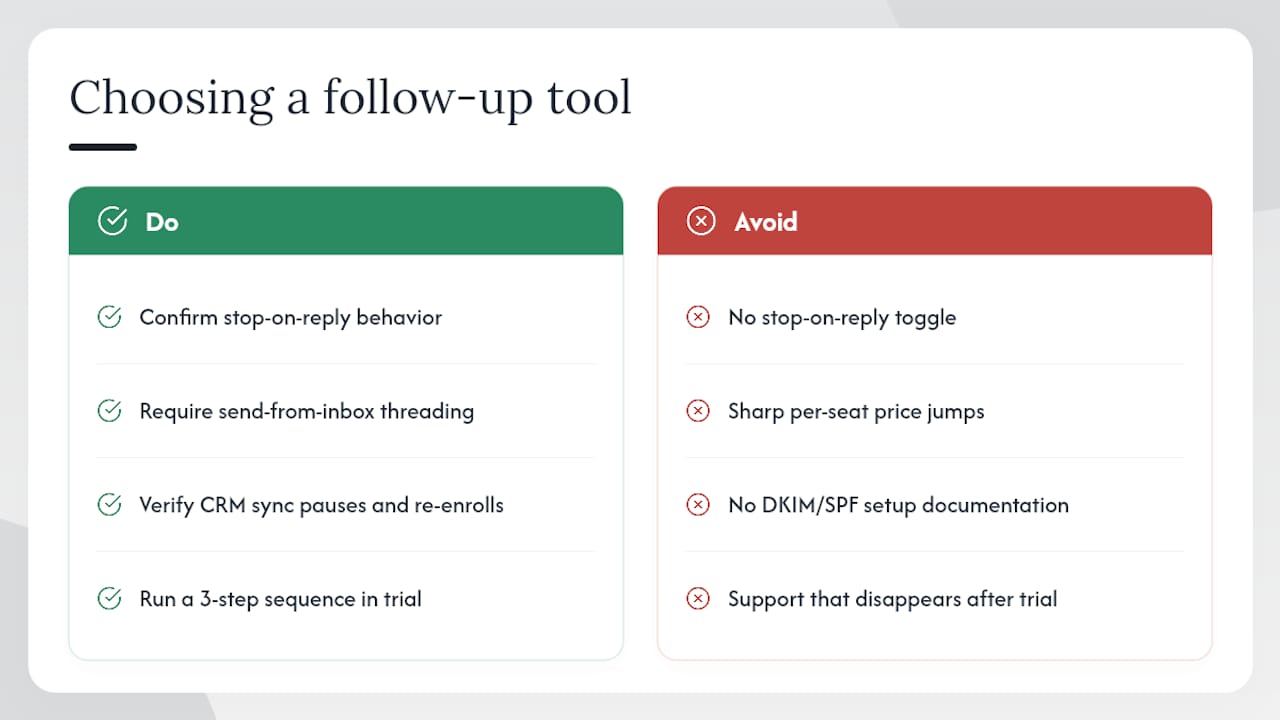
Does it stop on reply? This is non-negotiable for sales outreach. Tools that thread follow-ups into the original conversation and stop the workflow instantly on any reply eliminate the risk of a rep sending a “just checking in” message the day after a prospect already said yes. If a vendor cannot confirm stop-on-reply behavior, move on.
Does it send from your inbox or a platform address? Send-from-inbox threading keeps the conversation in one thread and preserves deliverability reputation tied to your domain. Platform-sent mass merges look like bulk mail to spam filters and to recipients.
How does it handle CRM sync? One-way data pushes create duplicate records and missed triggers. Ask specifically whether contact updates in the CRM pause or re-enroll sequences automatically.
What are the daily send caps and warm-up requirements? High-volume tools like Mailshake and Smartlead include domain warm-up guidance. Skipping warm-up on a new domain is the fastest way to land in spam.
What compliance support does the vendor provide? CAN-SPAM requires a physical address and a working unsubscribe mechanism in every commercial email. GDPR applies if any of your contacts are in the EU. Ask whether the platform auto-inserts unsubscribe links, manages suppression lists, and provides documentation for your compliance records.
Red flags to avoid: no stop-on-reply toggle; pricing that jumps sharply per seat at scale; no DKIM/SPF setup documentation; deliverability tools locked behind the highest tier; and support that disappears after the trial ends.
Trust signals worth weighting: a free trial of at least 14 days, published case studies from sales teams in your industry, native CRM integrations rather than Zapier-only workarounds, and onboarding resources that go beyond a knowledge base article.
Pro Tip: Before you commit to a paid plan, run your first three-step sequence entirely within the trial. If you cannot get a sequence live and measure one reply within the trial window, the tool is too complex for your team’s current capacity.
How do you build a working automated follow-up sequence from scratch?
Step-by-step setup
Define the goal. Reply rate for cold outreach; booking rate for warm leads; re-engagement rate for dormant contacts. One goal per sequence.
Select the trigger. Event-based (demo attended, asset downloaded), behavior-based (email opened or link clicked), or time-based (no reply after a set number of days).
Write three emails. Touch 1: value-add. Touch 2: social proof or a different angle. Touch 3: breakup. Keep each under 150 words.
Set wait times. Day 1 send, Day 3 follow-up, Day 7 second follow-up, Day 14 breakup. Adjust based on your sales cycle length.
Configure stop-on-reply. Confirm the setting is active before enrolling any contacts.
Enroll a small test batch. Start with 10–20 contacts to validate deliverability and copy before scaling.
Review and iterate. Check reply rate after 14 days. A/B test the subject line on touch 2 first, since that message tends to move reply rates most.
Trigger types and when to use them
Event-based triggers work best for warm leads who have already signaled interest (attended a webinar, downloaded a guide, requested a demo).
Behavior-based triggers suit mid-funnel contacts. If someone opens twice but never replies, a behavior-based branch can send a more direct message than the original sequence.
Time-based triggers are the default for cold outreach where you have no behavioral data yet.
The HubSpot community documents practical sequence settings and common troubleshooting steps that are worth reviewing before your first setup.
Cadence and timing
Mailchimp recommends matching frequency to the relationship and moving unresponsive leads to a lower-frequency nurture cadence rather than abandoning them. For cold outreach, four to five touches over two to three weeks is a reasonable starting cadence. After that, it is generally recommended to reduce follow-up frequency to a monthly nurture cadence rather than ceasing contact entirely.
The breakup email deserves more credit than most teams give it. Sent after four or five touches, it gives the prospect a low-pressure exit, while often generating the highest single-message engagement in the sequence. It also protects your sender reputation by removing uninterested contacts from future sends.
Three ready-to-use templates
Touch 1: Value-add
Hi [First Name], I noticed you [trigger action]. Here is one resource that addresses [specific pain point] directly: [link or one-sentence insight]. Worth a quick look — happy to discuss if it raises any questions.
Touch 2: Social proof
Hi [First Name], [Company similar to theirs] used this approach to [specific outcome]. I thought it might be relevant given [their context]. Would a 15-minute call this week make sense?
Touch 3: Breakup
Hi [First Name], I will keep this brief. If the timing is not right, no problem at all. I will close out my follow-ups here. If anything changes, my contact details are below.
For faster drafting, a structured AI prompt can generate three variants across these styles in under two minutes. Pair it with your AI for real estate workflows to keep templates consistent with your brand voice.
Gmail and Outlook quick tips
Gmail add-ons like Streak or Yet Another Mail Merge let you run basic sequences from your existing inbox, preserving the one-to-one threading that keeps replies in context. Outlook’s built-in follow-up flags work for simple reminders, though full sequencing requires an add-on or a connected platform. For either inbox, the priority is ensuring replies stop the sequence automatically rather than relying on manual monitoring.
Metrics to track
Reply rate is the primary KPI for sales sequences. Open rate tells you whether the subject line works; reply rate tells you whether the message works.
Click-through rate matters for sequences with a resource or booking link.
Conversion rate (reply to meeting booked, or meeting to deal) closes the loop on sequence ROI.
Unsubscribe rate above 0.5% on a sequence signals a targeting or messaging problem, not a volume problem.
Review metrics every 14 days for active sequences. A/B test one variable at a time, starting with the subject line on touch 2.
For teams tracking pipeline outcomes alongside sequence performance, a sales pipeline tracking framework helps map automation triggers directly to deal stages.
What actually works in sales follow-up automation
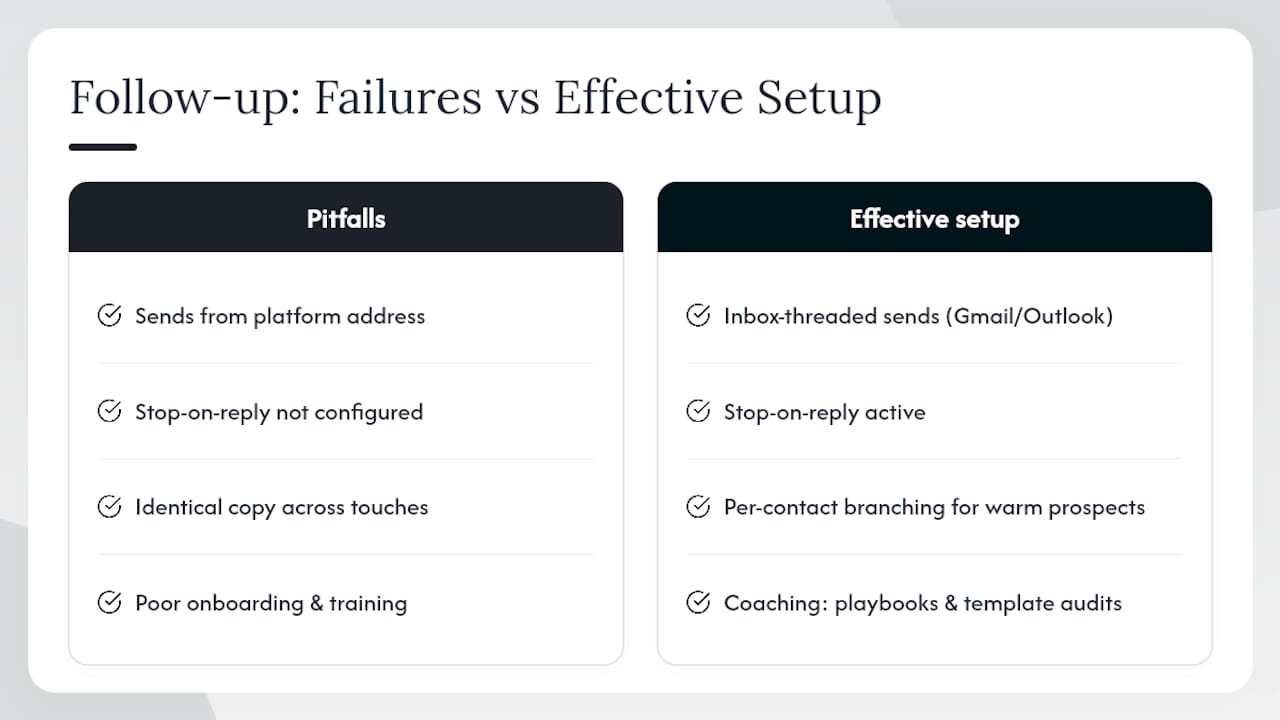
Most teams set up a sequence and then wonder why reply rates stay flat. The honest answer is usually one of three things: the sequence fires from a platform address instead of a personal inbox, stop-on-reply is not configured, or the copy is identical across all three touches.
The tools that consistently produce results share a common architecture: inbox-threaded sends from a connected Gmail or Outlook account, with stop-on-reply active and per-contact branching available for warm prospects. That architecture keeps the sequence personal even at scale. A prospect receiving touch 3 should not be able to tell it was automated.
Where coaching multiplies the impact is in adoption. Myeracareer’s Sales+ onboarding gives agent teams the playbooks and template audits that most platforms leave to the user to figure out independently. The difference between a team that runs sequences consistently and one that abandons them after the first month is almost always training, not technology.
Myeracareer Sales+ pairs automation with the coaching your team will actually use
Most platforms give you the tool. Myeracareer gives you the tool and the team capability to use it well. Sales+ includes onboarding playbooks, template audits, performance dashboards, and ongoing coaching designed specifically for real-estate agent teams. The result is a sequence that runs consistently across every agent on your roster, not just the ones who figured out the platform on their own.

For experienced agents looking to scale outreach and convert more leads, Sales+ integrates automation with the accountability structures that drive measurable pipeline uplift. If your team is onboarding new agents, the training component covers sequence setup, cadence rules, and compliance basics from day one.
The right next step depends on where your team is: new agents start here for onboarding and sequence foundations, while experienced agents can explore Sales+ directly to see how the platform fits your current workflow.
Useful resources for setup and vendor research
Automated Email Follow-Ups Boost Engagement and Action — Mailchimp’s cadence and strategy guide, including breakup email best practices.
5 Best Follow-Up Email Automation Tips — Pipedrive’s practical overview of trigger-based and scheduled follow-up automation.
How to Set Up Automated Follow-Up on Email — HubSpot community thread with sequence setup steps and troubleshooting.
Automated Follow-Up Sequences for Outlook and Gmail — Outsolvi’s explanation of inbox-threaded, stop-on-reply sequencing.
Send an Email with a Follow-Up Reminder in Outlook — Microsoft’s official guide to native Outlook follow-up flags.
Mailshake Follow-Up Features — Mailshake’s product page for cold outreach sequencing.
Automated Follow-Ups for Email and LinkedIn — Salesforge on multichannel sequencing and reply-rate data.
AI Prompts for Follow-Up Emails — PromptRocket’s copy-paste ChatGPT prompt for generating value-add, social proof, and breakup variants.
Best SMS Marketing Platforms for U.S. Real Estate Agents — Practical comparison of SMS channels to pair with email sequences for agent outreach.
Sources
Automated Email Follow-Ups Boost Engagement and Action | Mailchimp
5 Best Follow-Up Email Automation Tips
How to set up automated follow up on email | HubSpot Community
Automated Follow-Up Sequences for Outlook and Gmail (2026) | Outsolvi | Outsolvi
Recommended
Comments